What are Cycle Zones?
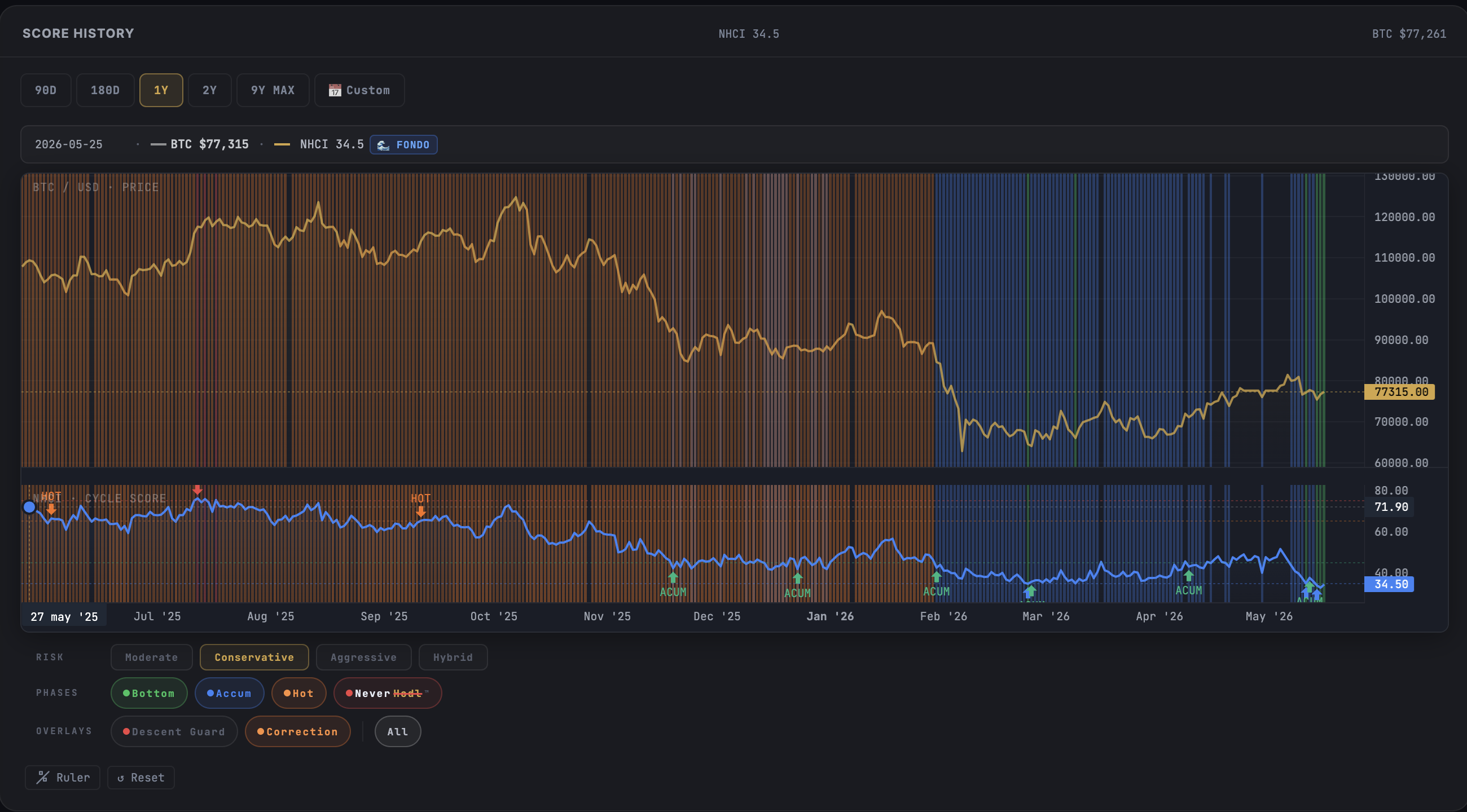
Cycle Zones are colored vertical bands painted directly on the NeverHodl™ dashboard charts. Each band represents the NHCI phase that Bitcoin was in on that specific day - green for Bottom, blue for Accumulation, orange for Hot Zone, and red for NeverHodl™.
The bands appear on both charts simultaneously - the BTC Price chart and the NHCI Score chart - giving you a complete visual history of every cycle phase since 2017. They are OFF by default. You discover and activate them via toggle buttons below the chart.
The 4 phases explained
Each phase corresponds to a range of the NHCI Score (0–100). The bands highlight days when the score fell within each range - giving you an instant visual map of cycle history.
Why is Bull (45–65) not shown? It covers 54% of all historical days. Showing it would paint most of the chart amber - noise, not information. The phases that matter for decisions are the extremes: opportunity zones and risk zones.
How to activate Cycle Zones
- Open the NeverHodl™ Dashboard
- Below the chart, find the PHASES row with colored dot buttons
- Click individual phases (Bottom, Accum, Hot, NH) to toggle each one, or click ALL to show/hide everything at once
- Bands appear on both charts (BTC Price + NHCI Score) simultaneously
Your preferences are saved automatically - when you come back tomorrow, the same bands will be visible.
Tip: In the screenshot above, you can see the PHASES and OVERLAYS rows at the bottom of the chart. The colored buttons (Bottom, Accum, Hot, NeverHodl™) each toggle one phase band. The RISK row at the top lets Pro users switch profiles.
Overlay signals: Correction & Descent Guard
Below the phase buttons, you'll find the OVERLAYS row - two additional signals that layer on top of the phase bands.
Overlays are additive - they render on top of the phase bands, giving you two layers of information at once. Overlay signals are a Pro feature ($49/mo) - they provide the advanced context that helps you distinguish between a temporary pullback and a real trend reversal.
Risk Profiles: Customize your zones (Pro)
Not every investor has the same risk tolerance. Pro subscribers can switch between 4 risk profiles that shift the phase thresholds - and the bands recalculate in real-time.
All 4 profiles are calibrated using a quantitative backtest of 3,423 days of real NHCI data (2017–2026), with time-weighted scoring to prioritize modern market conditions.
Reading the chart: what to look for
- Long green stretches = Extended accumulation windows. Historically the best moments to build positions. The longer the green band, the deeper the opportunity.
- Red bands after extended bull = Time to review your exit strategy. When red appears after months of no red, the cycle is reaching its peak.
- Orange correction overlays during bull = Temporary weakness. The macro trend is intact - these pullbacks are often opportunities within a bull market.
- Red Descent Guard during hot zone = Potential cycle top forming. The score is falling from elevated levels - high alert for a possible transition to bear territory.
Key takeaways
- Cycle Zones paint the NHCI phase history directly on the chart - no mental mapping needed
- 4 phases shown: Bottom (green), Accumulation (blue), Hot Zone (orange), NeverHodl™ (red). Bull omitted intentionally (54% of all days = noise)
- Overlay signals (Correction & Descent Guard) add context without replacing the phase bands
- Risk Profiles (Pro) let you customize the thresholds to match your investment style
- Bands appear on both charts simultaneously and your toggle preferences are saved automatically
Cycle Zones are the honest way to read a chart: they show you where risk and opportunity actually sat, not where sentiment told you they were. I have watched too many people confuse a green band with a promise. It is not. The bands describe conditions, not outcomes, and the extremes are rarer than your emotions suggest. Crypto rewards patience across full cycles. Use the colors to check yourself, never to time perfectly.
Frequently asked questions
How do I turn on Cycle Zones?
Below the chart on the NeverHodl dashboard, click the phase buttons in the PHASES row. Each button toggles a colored band. Click ALL to show or hide everything at once.
Why is Bull phase not shown as a band?
Bull (NHCI Score 45–65) covers 54% of all historical days. Showing it would paint most of the chart amber, making it unreadable. The phases that matter for decisions are the extremes.
Are Cycle Zones available for free?
Phase bands (Bottom, Accumulation, Hot Zone, NeverHodl™) are available for free registered users. Overlay signals (Correction, Descent Guard) and Risk Profile customization require NeverHodl Pro ($49/mo). Anonymous visitors can preview the chart and register free to unlock bands.
Do the bands show on both charts?
Yes. Cycle Zone bands appear synchronized on both the BTC Price chart and the NHCI Score chart, giving you a complete visual history of every cycle phase.
Try Cycle Zones on the live dashboard
Cycle Zones show you where opportunity and risk appeared - across 9 years of Bitcoin history. The NHCI Score updates every hour, free, no registration.
Disclaimer: The NHCI Score is an educational market data tool. It does not constitute financial advice. NeverHodl™ does not tell users to buy or sell - it shows the data and the opportunity. The user decides. Past performance does not guarantee future results. Always DYOR. MiCA EU 2023/1114. OEPM M4370276.